De-identification

Take the person out. Keep the paperwork.

Blacking a name out is easy, and it costs you the file: nobody can read it, and it no longer ties to the 1099 or the workpaper it belonged with. A tax file set is nothing but ties. So every identifying value is replaced instead — and the same real value becomes the same stand-in in every file, so the set still hangs together and no number moves.

One client, three files

The names change. The paperwork still works.

One client, three files. The name and the SSN tie the W-2 and the 1099 together; the workpaper ties to both by company name. Hover a value to see where else it appears.

Received from the client
Form W-2
EmployeeJay Gatsby
SSN123-45-6789
Address312 Harbor View Road, Apt 5C
Port Washington, NY 11050
EmployerHarborline Trust Company
EIN12-3456789
Phone(516) 555-0148
Box 1 Wages184,320.00
Box 2 Federal withheld38,114.00
Box 17 State income tax9,061.00
Received from the client
Form 1099-NEC
RecipientJay Gatsby
Recipient TIN123-45-6789
PayerKestrel Point Media
Payer TIN84-2210067
Box 1 Nonemployee comp22,500.00
Written by the firm
Income workpaper
TaxpayerJay Gatsby
SSN123-45-6789
WagesHarborline Trust Company
184,320.00
Nonemployee compKestrel Point Media
22,500.00
Total income206,820.00
A real output file

This is not a mock-up of the W-2 above. It is the W-2 above.

Put through the pipeline and rendered: the stand-ins are typed into the space each value occupied, the city, state, ZIP and every dollar amount are untouched, and the page still reads as a W-2. Nothing is selectable in it — the document was rebuilt from pixels, so the original characters are not in the file to be copied, recovered or indexed.
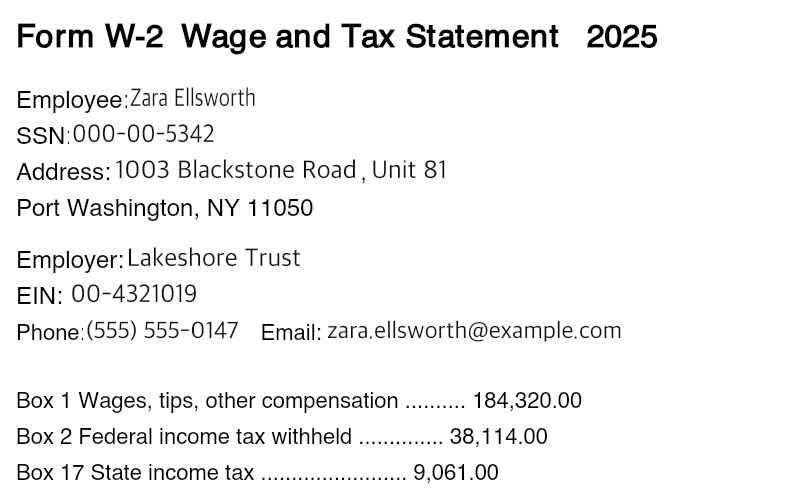
The same W-2 after de-identification, still fully legible: the employee reads Zara Ellsworth, the SSN 000-00-5342, the employer Lakeshore Trust. Port Washington, NY 11050 and every dollar amount are unchanged.
How it works

Four passes over every file.

It runs on the accountant's own machine, over every document in a demo client — as each one lands, before anyone has to remember to ask.

1

Read the documents

  • A PDF printed from software gives up its text and the exact rectangle every word sits in.
  • Spreadsheets and text files are read as text, cell by cell.
  • A page that was photographed or scanned carries no text at all, so it is rendered and looked at instead — the same way a photograph of a W-2 is.
2

Find what identifies a person

  • First from what the workspace already knows: this client's own name, SSN, EIN, email, phone and street. Exact, not guessed.
  • Then from everything learned on earlier documents — an employer first seen in a photographed W-2 is matched by name the next time it appears anywhere.
  • Then by reading the batch for the ones nobody has seen yet: a broker, a dependant, a spouse, a licence number. Each one is written into the dictionary the first two draw on, so the whole set of documents agrees with itself.
3

Rebuild the file

  • Text and spreadsheets get a stand-in written into the file. The original characters are gone, not hidden.
  • A PDF or a photograph is re-rendered, the stand-in is typed into the space each value occupied, and the result is assembled into a new file. There is no text layer left to hide anything under.
  • Metadata, annotations, form-field values and the document's incremental-update history do not survive the rebuild either.
  • The file name goes too. A name in the Finder identifies as loudly as one on the page, and louder on a shared screen.
4

Say which documents changed, and which did not

  • The folder is read back off disk afterwards and every file is compared, byte for byte, against the copy taken before anything ran.
  • A document that did not change is named out loud rather than counted as handled — it may still hold real values, and that is the one thing the accountant has to know before they open it in front of somebody.
  • Nothing is reported as verified. A rebuilt page has no text left to scan, so the check is a person reading it against the original beside it, with every replaced value lit up.
What stays

Three things are deliberately left alone.

The city and the state

They decide which return gets filed and which local tax applies, and a city does not identify a household. The street line does — so the street line is what goes.

Every dollar amount

Wages, withholding, basis, balances. A number is not an identity, and a tax document with its numbers taken out is not a tax document.

The shape of the page

A two-word name becomes a two-word name. A hyphenated ID keeps its hyphens. A legal suffix stays an LLC. It still reads as a W-2, because a document nobody can read proves nothing.

Why the stand-in holds

One person becomes one other person.

Every file in a set agrees with every other, and the stand-in is never a name borrowed from somebody who exists.

Chosen once, then kept

A name is read and a stand-in is chosen for it — in the same script, the same register, the same shape — and recorded. Every later file uses the one already chosen, so the W-2, the 1099 and the spreadsheet name the same person.

Never a real person's number

Stand-ins are drawn from ranges that cannot be issued: a social security number in a block that was never assigned, a phone number in the range reserved for fiction, an email on a domain that can never be registered. A fake that could be someone's real number is a new problem, not a fix for the old one, so the rebuilt pages are read back by a person before anything is shown.